B2B · SaaS · Built from scratch
Inspect - Inspection Job Booking App
Designed and built Inspect — a web app to book and schedule rope inspection jobs for the construction industry.
Context & Challenge
My ex-boss runs a rope and crane inspection business, and before Inspect, everything ran on phone calls and WhatsApp — requests, scheduling, assignments, status updates, all of it. There was no central system, no way to see the schedule at a glance, and no way to keep a requestor in the loop without someone manually messaging them.
Key entities: Job Request → Job → Assignment
Personas: the requestor (the client submitting a job), the admin — everyone at the company just calls them "the programmer" — who accepts, schedules, and assigns jobs, and the FSP (Field Service Partner), the inspector who actually shows up on site.
The core design tension: I wanted requestors to feel informed and able to track their job without making them sign up for yet another account, while still giving the admin full control over scheduling and assignment.
Strategic constraint: one month for the first version, and I was designing and building it entirely on my own.
The trigger: the admin had basically become a human relay — forwarding attachments and contact details back and forth, scrolling through long WhatsApp threads just to dig up info that was buried somewhere in the conversation. That repeated time sink is what made building a proper system worth it.
My Role & Impact
Role: I designed and built this one entirely solo — research, UX, UI, front-end and back-end.
Duration: One month for the first iteration. Team: Just me on design and development, with the business owner as my main stakeholder and client. I was also training to become an FSP myself during this project, which turned out to be a real advantage — I got first-hand insight into what the field side actually needs.
Key contributions:
- Designed and built the whole system from scratch — the public request form, the admin console, and the FSP login.
- Figured out the three-role access model (requestor, admin, FSP) and how the job lifecycle connects them.
- Just wrapped up beta testing on the dev server, and we've opened the production server for real clients to start submitting requests — so the real numbers are still coming in.
- The admin's feedback so far: a much clearer picture of the schedule, seeing who's doing what job each day, and no more accidentally double-booking an FSP across AM/PM sessions.
- FSP feedback so far: no more scrolling through WhatsApp to piece together job and contact details — it's all sitting in one place now.
Process & Collaboration
- Scoped requirements directly with the business owner — the "programmer" — as my client.
- Mapped out the job lifecycle across all three roles — request, accept/schedule/assign, field execution, status updates — to see exactly where a system could take over from manual coordination.
- Training as an FSP myself meant I got direct, first-hand exposure to what field inspectors actually need, instead of relying on secondhand requirements.
- The priority was just getting something basic and functional live within the month — the goal was to get requestors, the admin, and FSPs actually using it, so we could gather real feedback on what to improve next.
- One thing we cut: automated WhatsApp status update messages. I wasn't familiar with the WhatsApp Business API, and even with AI's help, it would've been too technically involved to ship within the timeline — on top of the time Meta needs to verify a business account.
- Another cut: letting FSPs accept assignments in-app. Instead, the admin and FSP still hash it out over WhatsApp, and the admin updates the schedule afterward.
- Neither cut really hurt, since I'd already built a workaround: a button on the job details page that opens WhatsApp with a pre-filled message, ready to send.
Decision 1: Three Scoped Roles — Requestor, Admin, FSP
Situation
Job coordination happened entirely over phone and WhatsApp, with no separation between who could request a job, who scheduled and assigned it, and who actually executed it in the field. Everyone touching a job needed a different slice of information and a different set of actions.
Options Considered
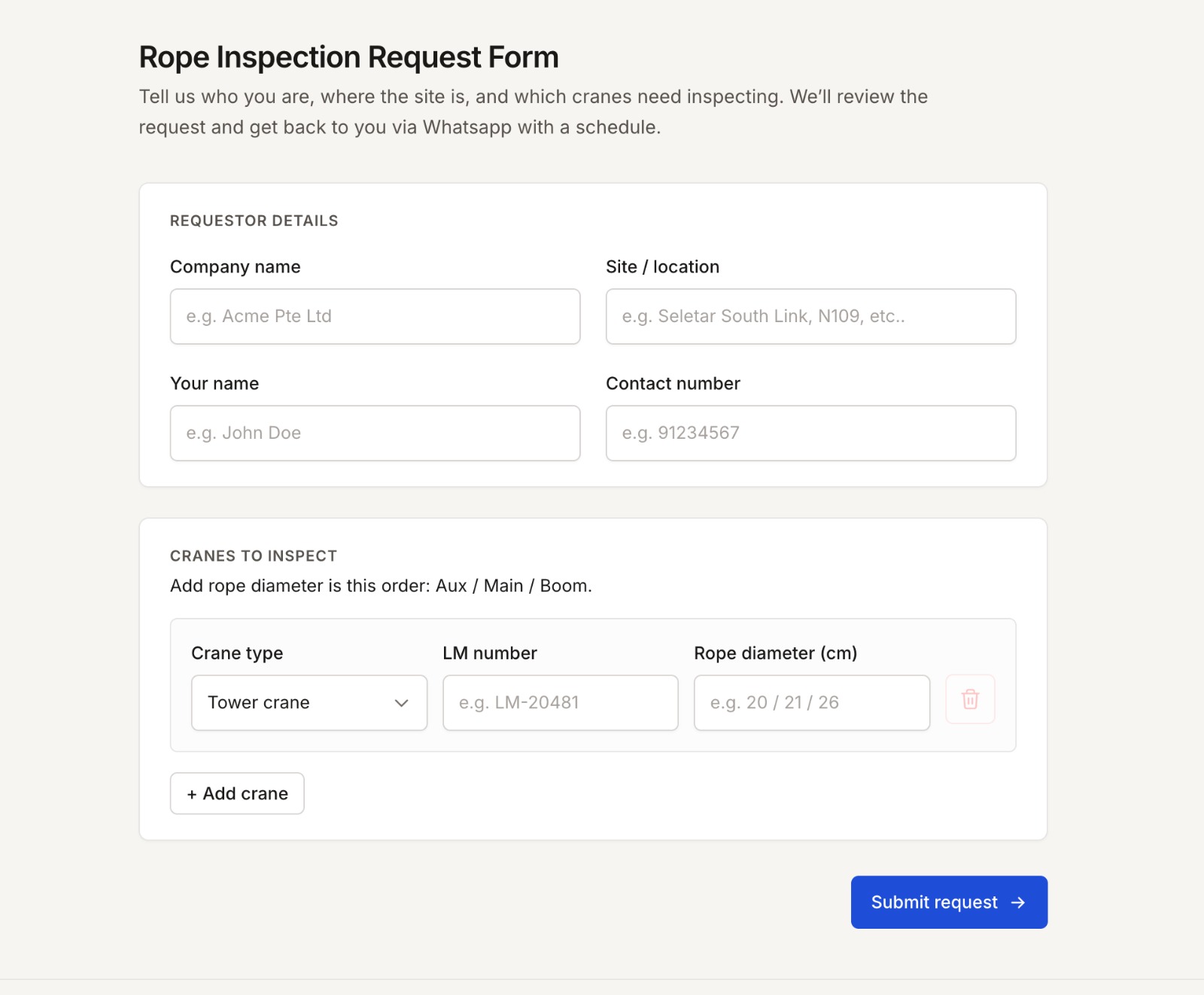
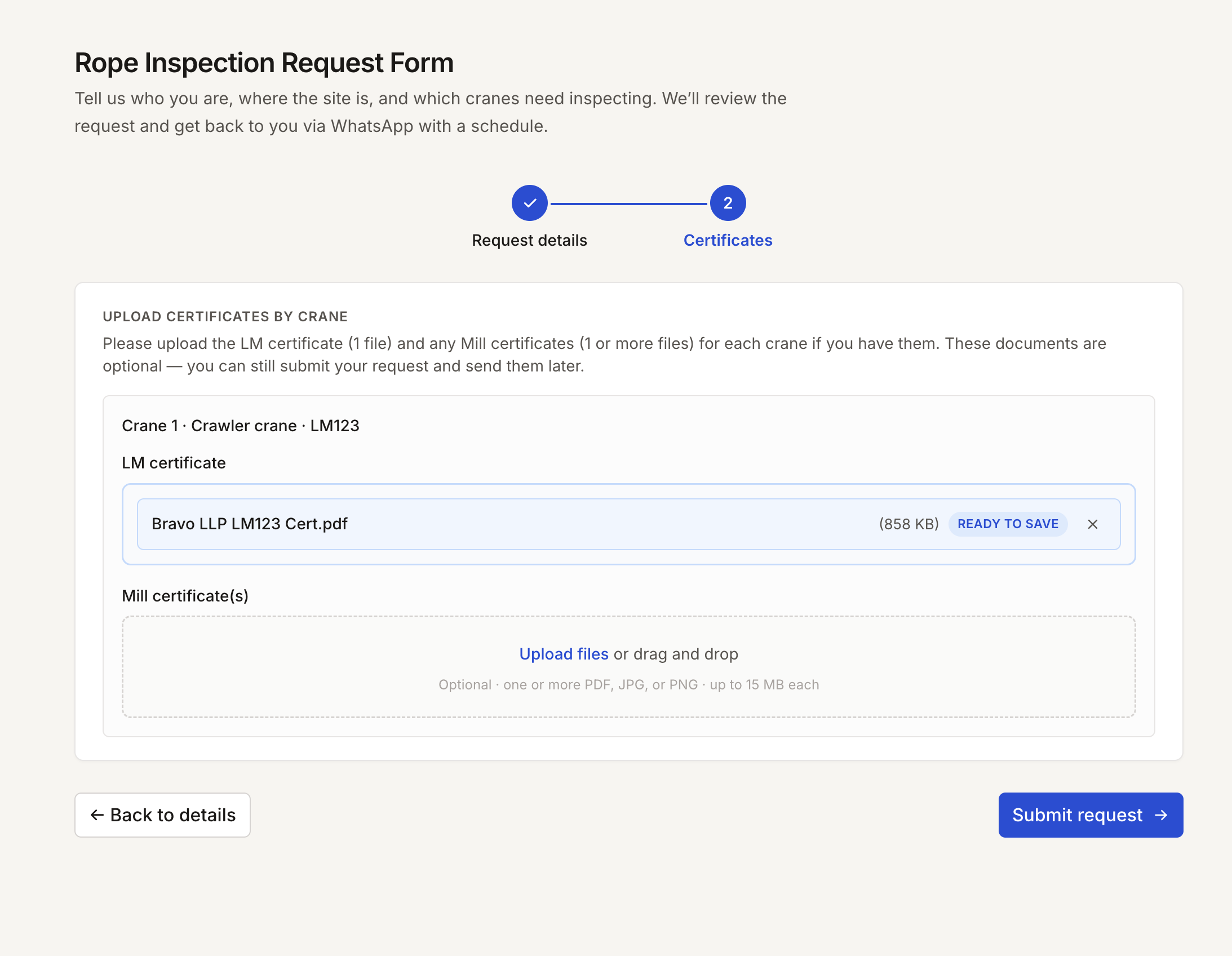
- Requiring requestors to sign up for an account before submitting a request: I dropped this — it's too much friction for a request that might not even get accepted. Instead, I kept the form as light as possible, asking only for the essentials, and made the LM and MILL certs optional in case the requestor doesn't have them on hand.
- Building this out as a full CRM to manage clients: out of scope for this first version — the brief was booking and scheduling, not managing client relationships.
- A single shared login for admin and FSP: I wanted this at first, but split them into separate logins once I realized FSPs need their own fields — FSP number, joined date, operator level — that don't apply to admins.
Decision
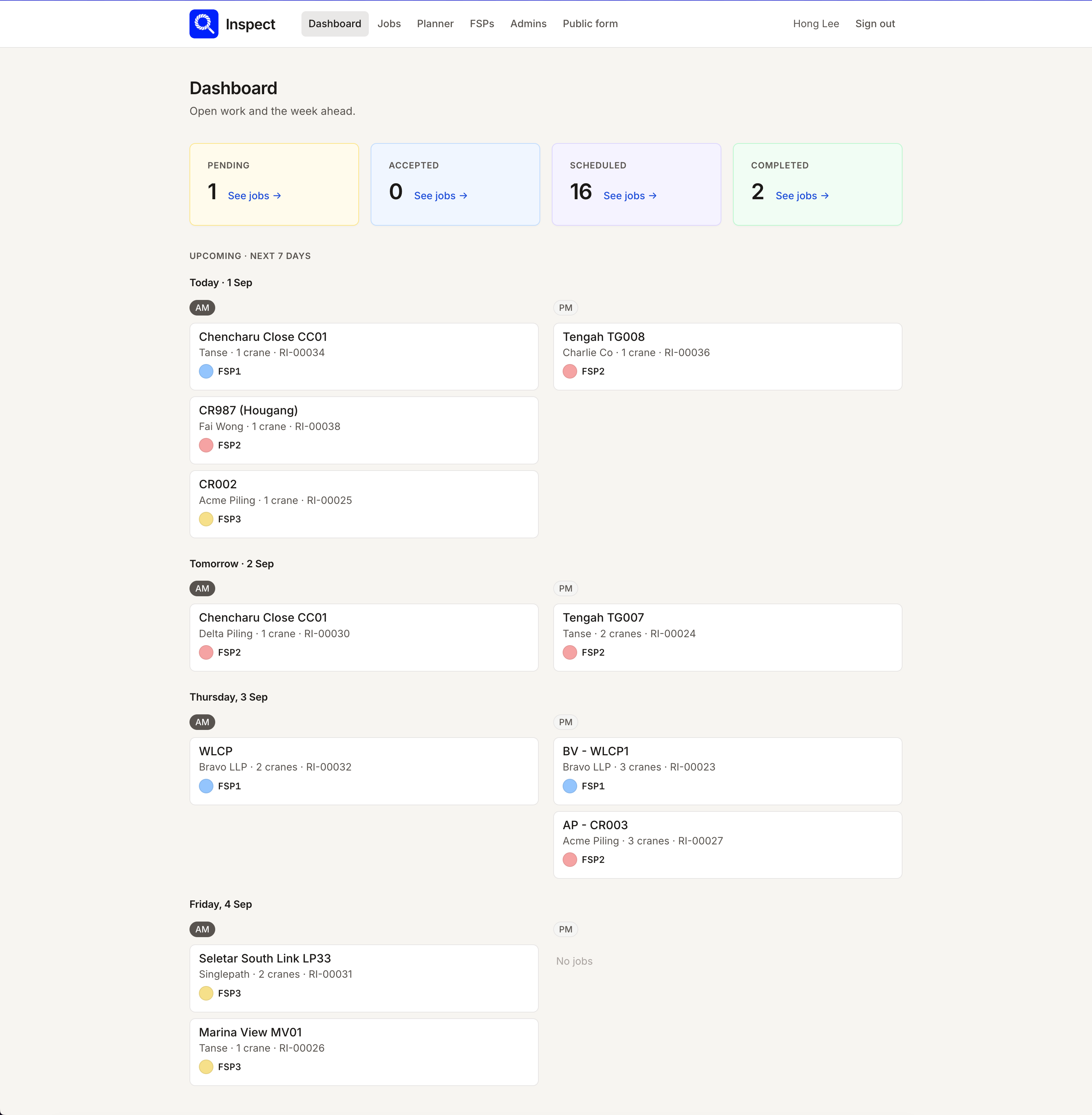
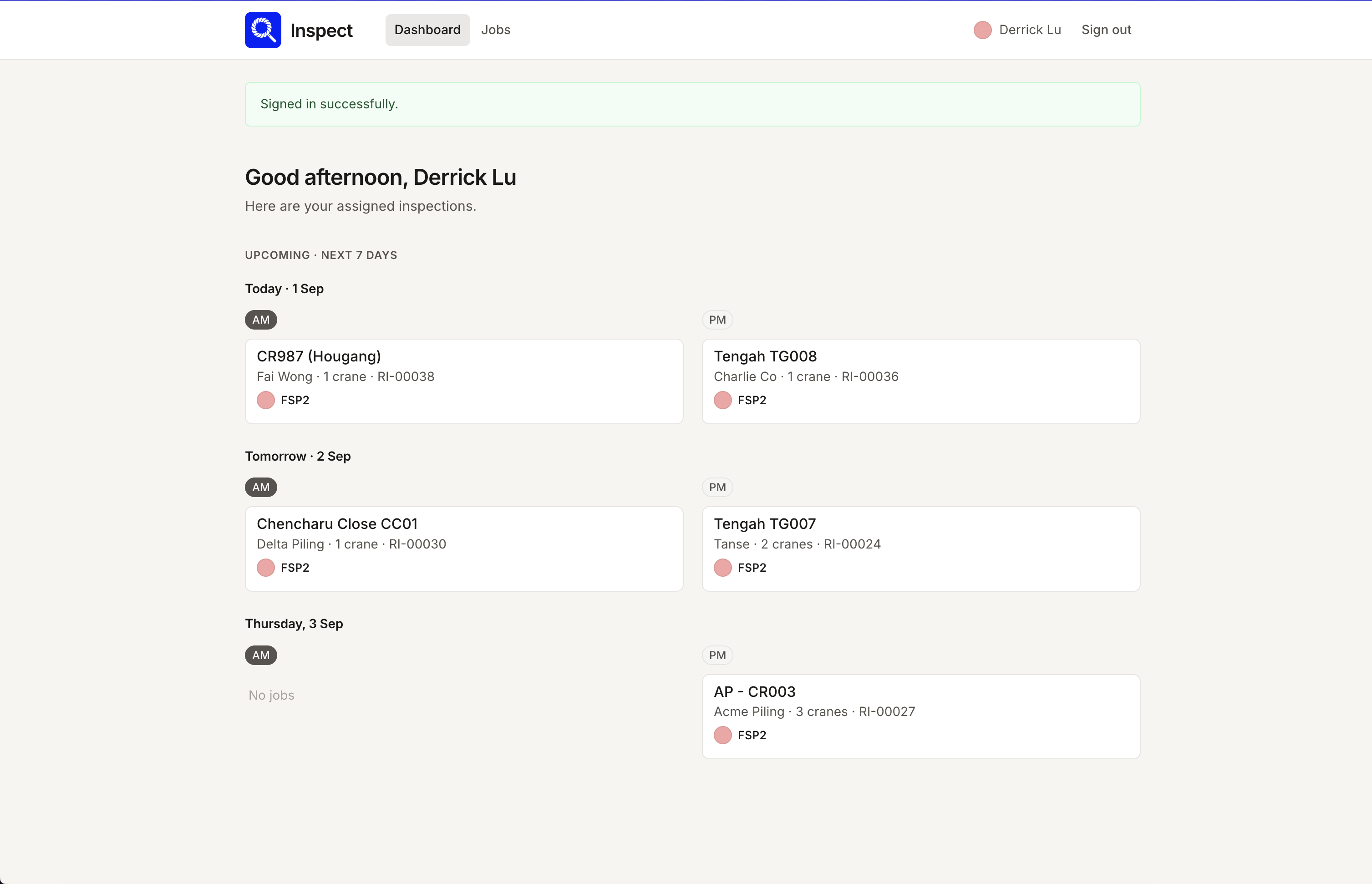
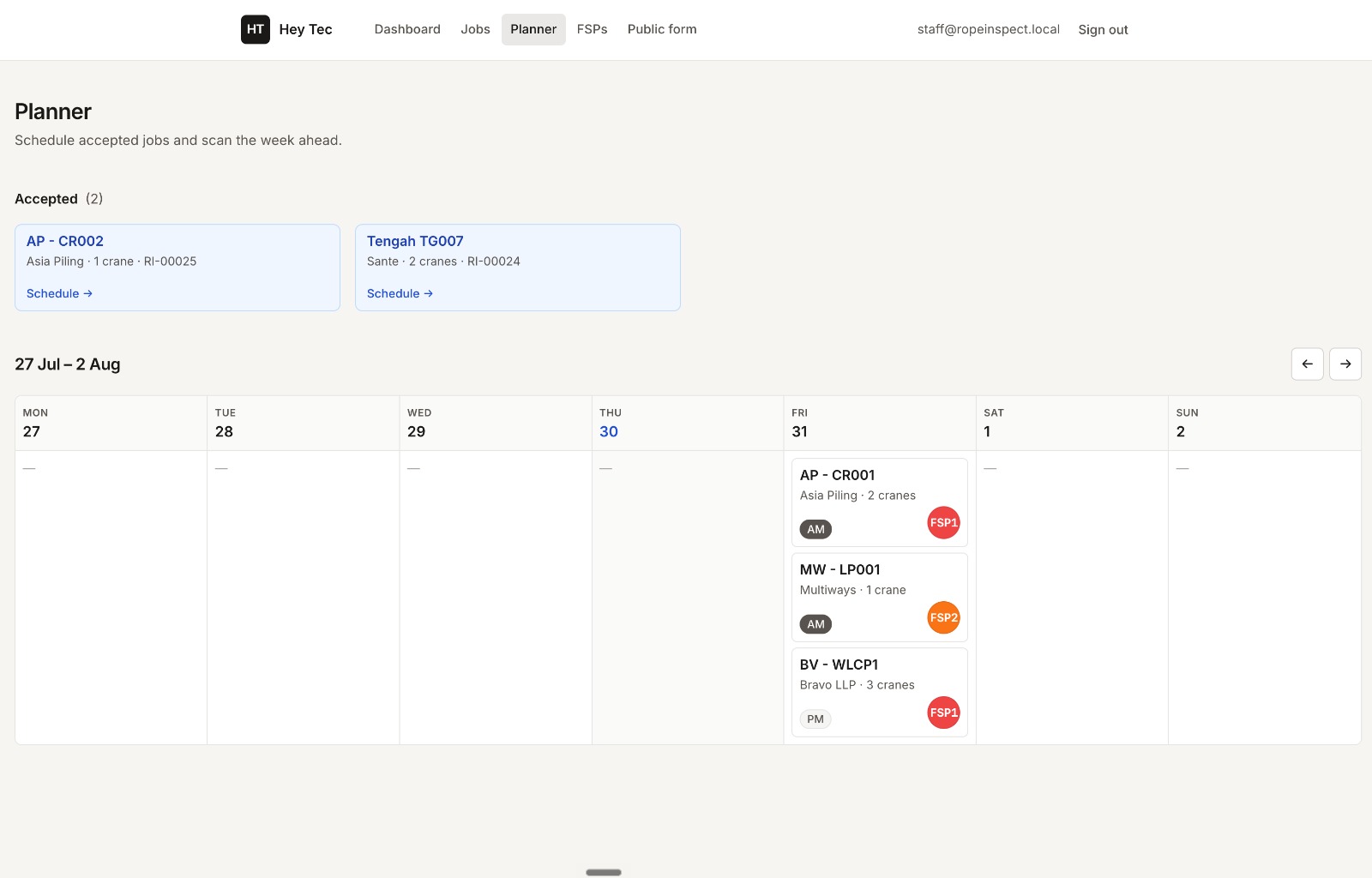
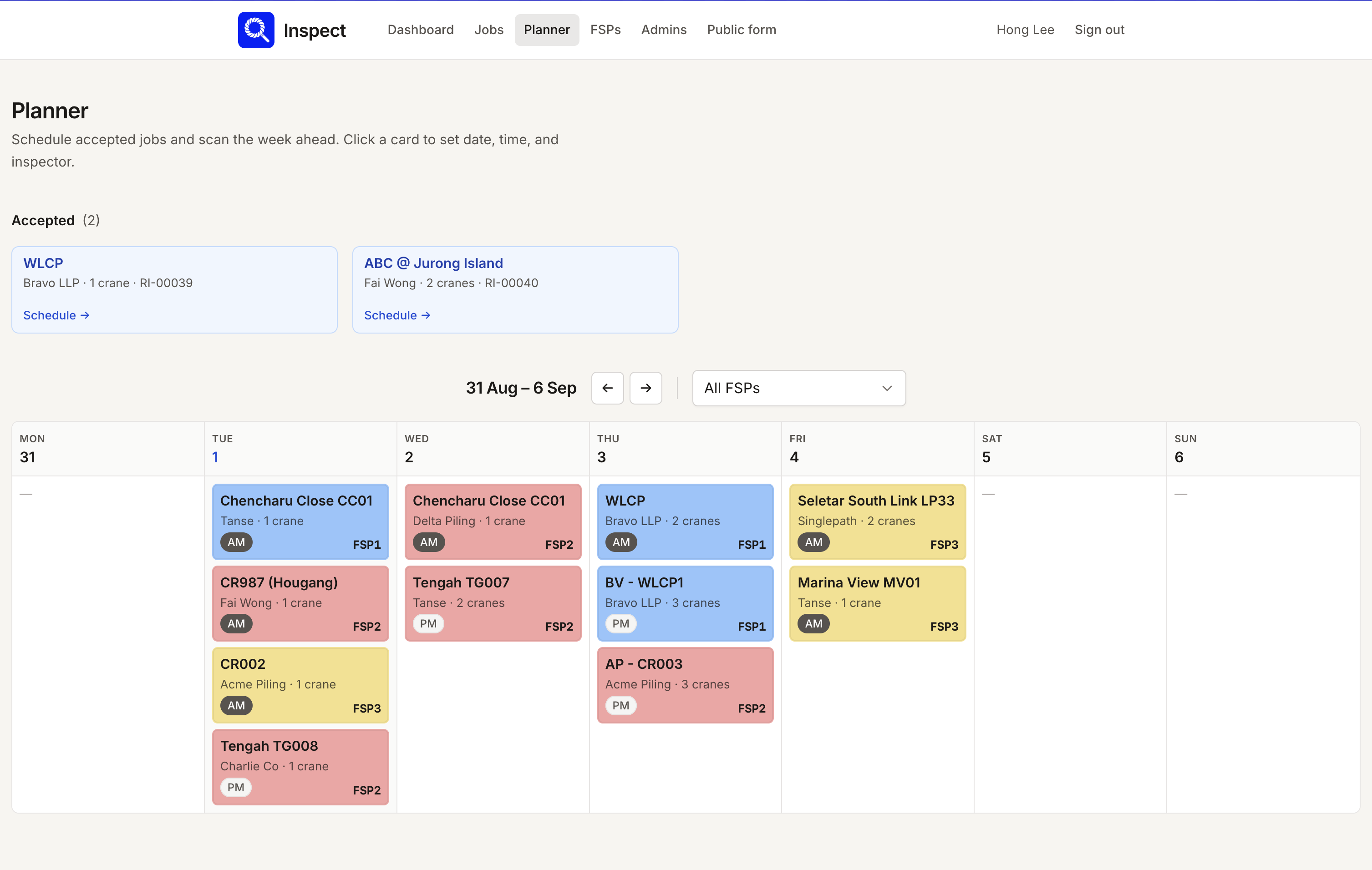
I built three scoped experiences: a public-facing form for requestors to submit jobs with no account needed, an admin console for accepting, scheduling, and assigning jobs, and an authenticated login for FSPs that only shows jobs assigned to them.
Rationale
Each role really only needs to see and do a narrow slice of the job lifecycle. Keeping the request form public removes friction for the client's customers, and scoping the FSP view to just their assigned jobs keeps the field experience focused — no need to expose jobs that aren't theirs.
Result
The admin now gets a clear bird's-eye view of every inspection job on the planner page, full job details on the listing page, and a record of what each FSP has done or is assigned to. For FSPs, it's just as simple — they see the schedule for the upcoming week and the details for those jobs, with completed jobs out of sight so there's less to think about.
Decision 2: Keeping Requestors Updated Without Requiring an Account
Situation
Requestors are usually construction-industry clients who just want a status update, not another account to manage. Requiring a login would've added friction exactly where the business needed to look easy to work with.
Options Considered
- Email updates: dropped — it felt old-school and slow; requestors aren't checking email the way they check WhatsApp.
- WhatsApp: the obvious default, since it's the app everyone involved already uses constantly.
- A public link: kept alongside WhatsApp, since it lets a requestor forward status to their own managers or supervisors without dragging them into the same WhatsApp group and pinging them constantly.
Decision
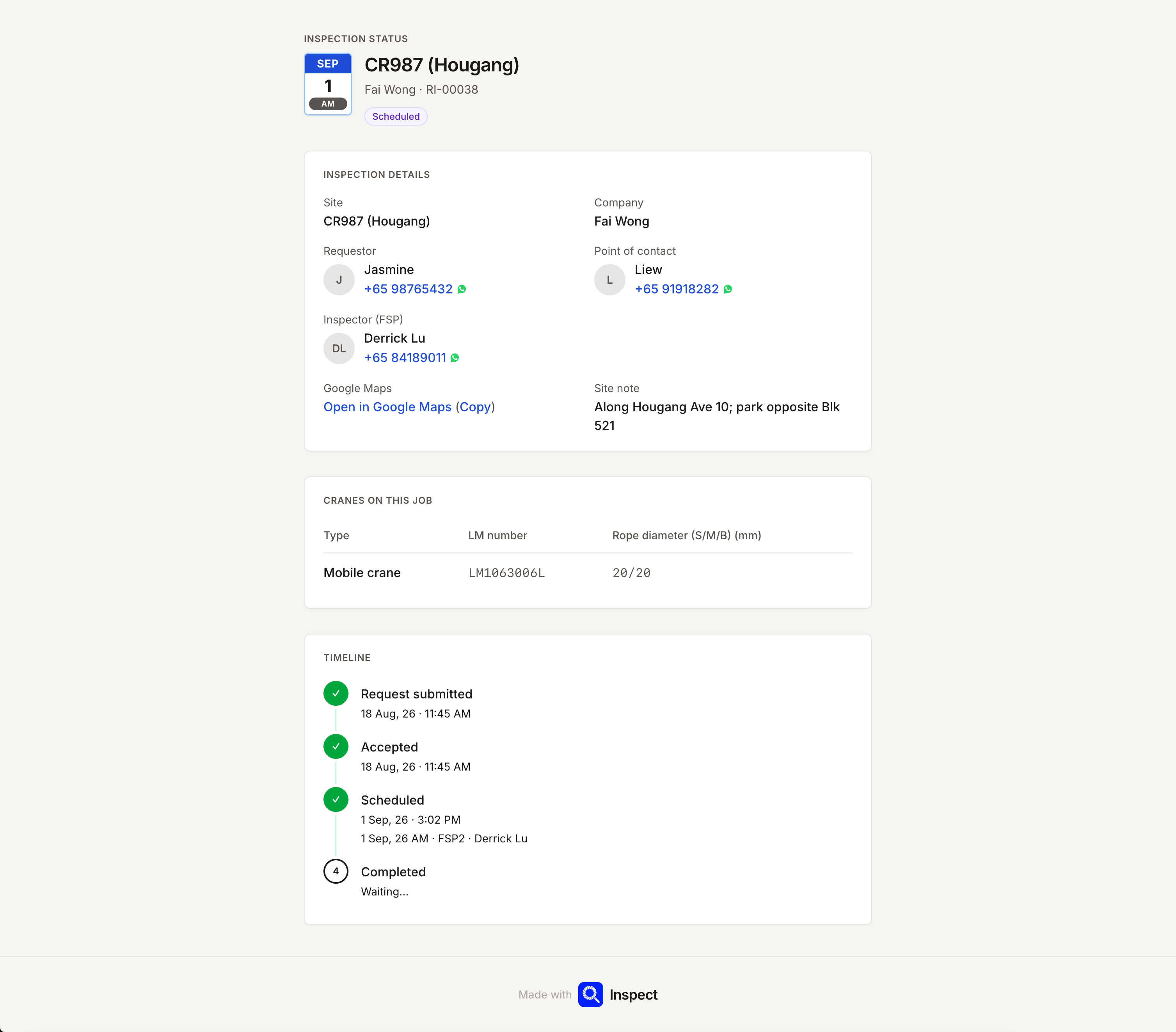
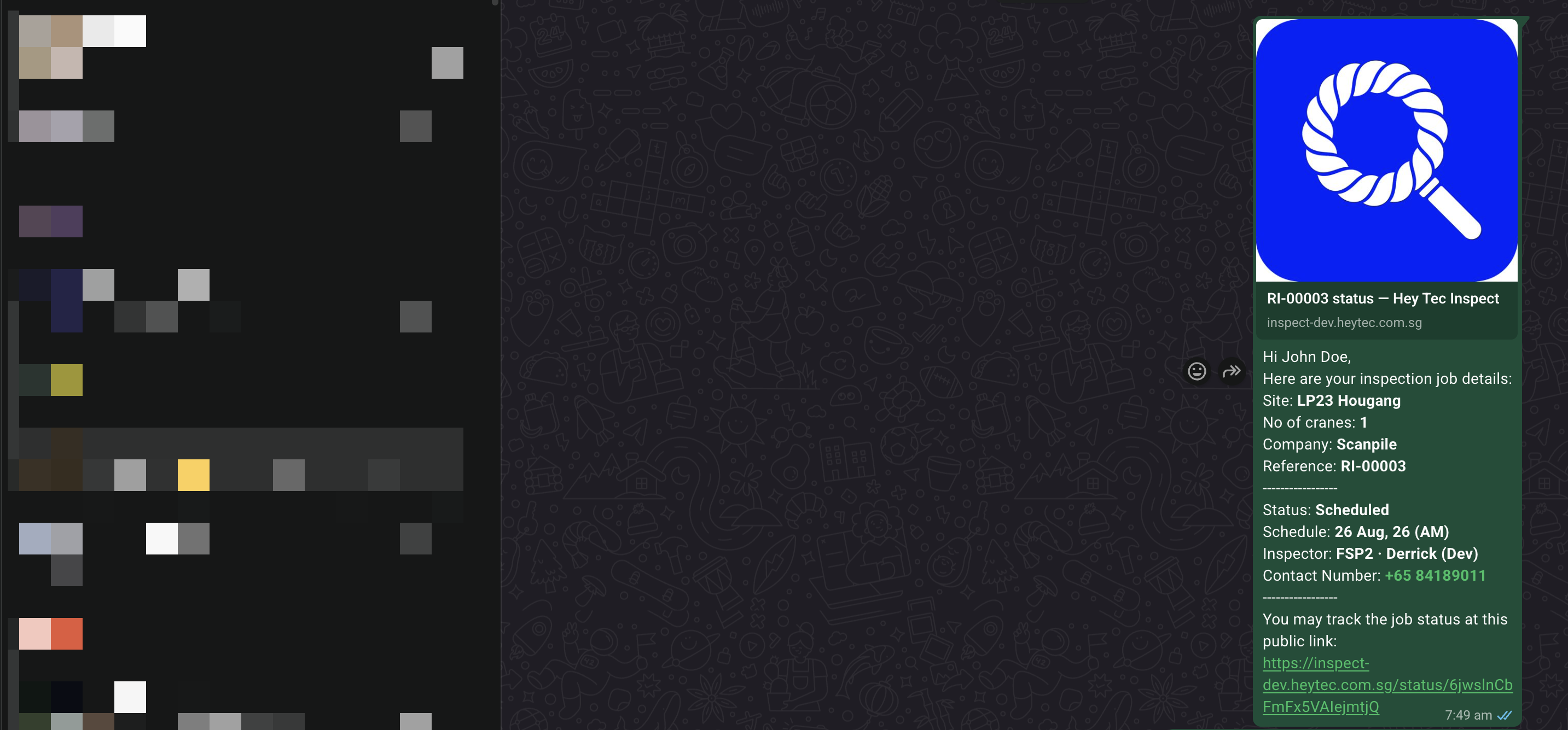
Admins send job updates to the requestor either through a WhatsApp message or a public shareable link — no login required on the requestor's end.
Rationale
This just mirrors how the business already talks to its clients, so it doesn't introduce a new habit. And the public link gives a persistent, shareable reference point without the overhead of setting up an account.
Result
Still to be seen — I'll know more once real clients start using it.
Decision 3: Capturing Accurate Job-Site Location and Point-of-Contact Details
Situation
Inspection jobs happen at physical sites — often construction sites — that need a precise location and a point of contact (POC) for the FSP to coordinate with on arrival. Addresses alone aren't always reliable for construction sites, and contact numbers need to actually do something, not just sit there as text.
Options Considered
- This wasn't even in the initial prototype — it only became obvious once we started internal testing and I remembered my own frustration just trying to get to a site.
- An embedded map on the details page: dropped — it didn't add much on its own. What actually mattered was a link that opens straight into Google Maps for turn-by-turn directions, not a static map sitting on the page.
Decision
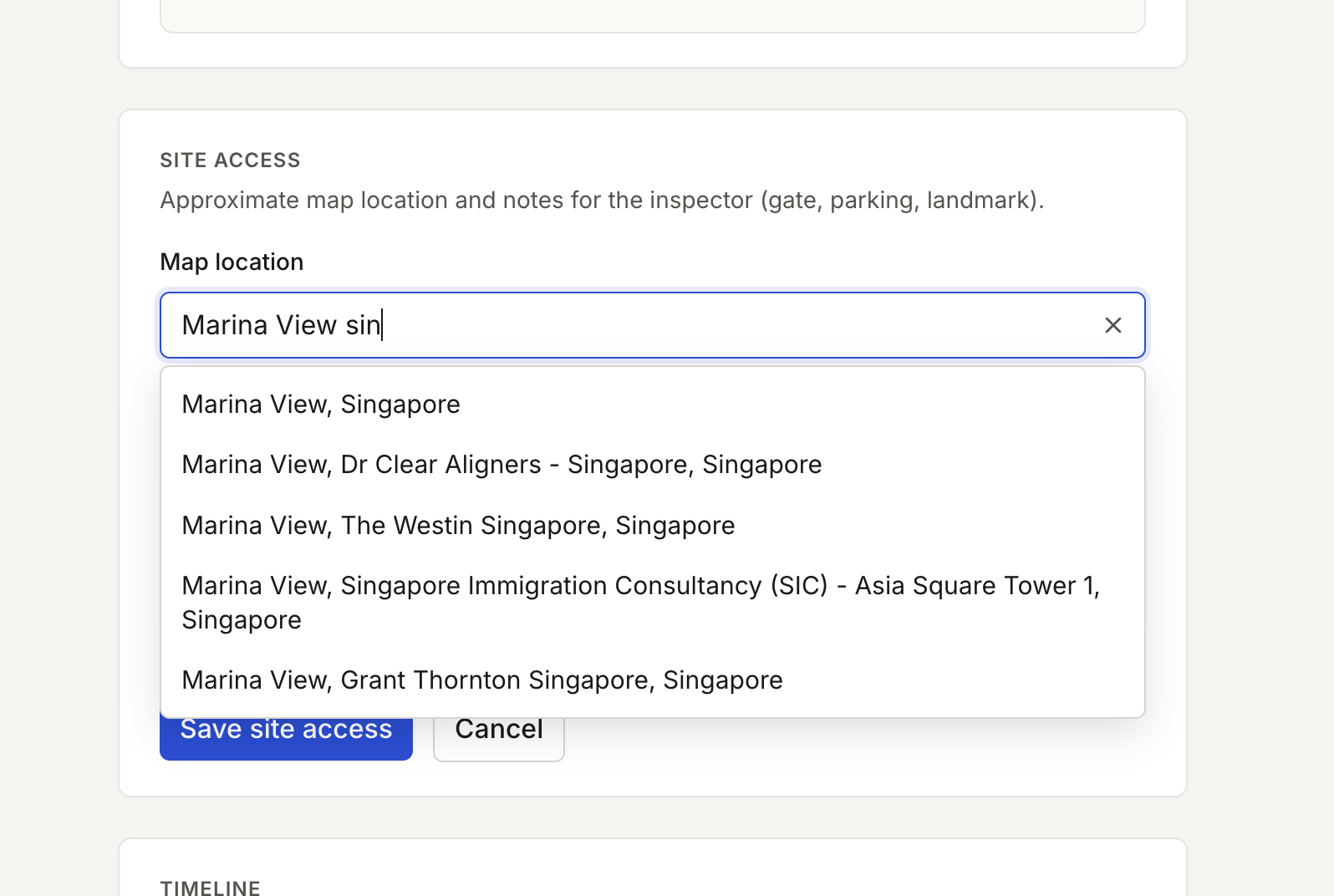
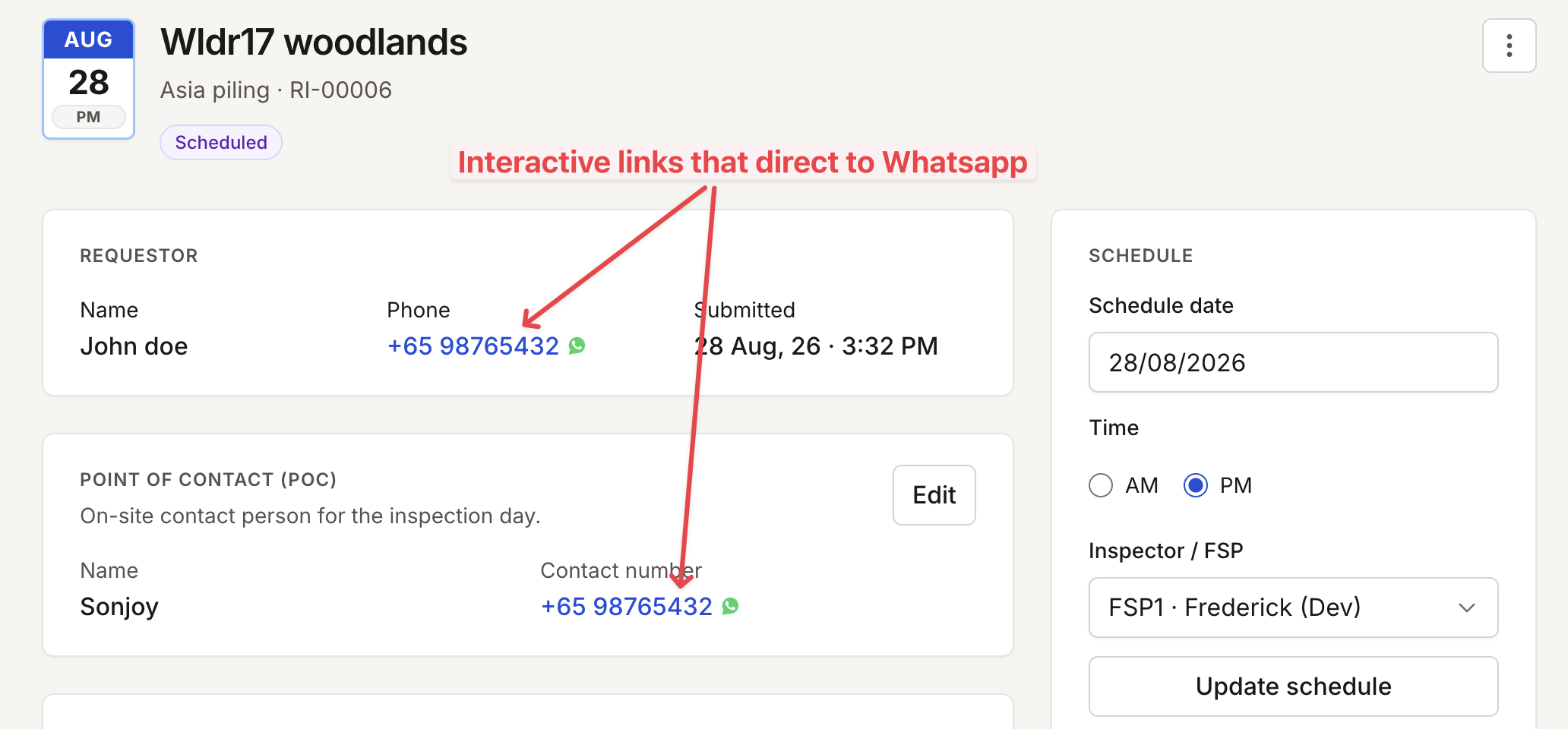
Admins can set the actual job location either by typing an address with autocomplete, or by dropping a pin manually on Google Maps for sites that don't have a clean address. Contact numbers are tap-to-WhatsApp — tapping one opens WhatsApp directly to message or call, instead of showing a plain number or routing through the phone's native dialer.
Rationale
Construction sites often don't resolve cleanly to a mapped address, so manual pin-drop is a necessary fallback to autocomplete. And routing contact numbers straight to WhatsApp just matches how the business and its FSPs already talk to each other — it saves a copy-paste step.
Result
With the actual site access location and notes on hand, the FSP can get to the site faster and figure out the nearest parking ahead of time. Before this, FSPs would sometimes end up at the wrong gate and have to make a huge detour — wasting time and effort right when they're on-site.
Decision 4: Reference Documentation for FSPs
Situation
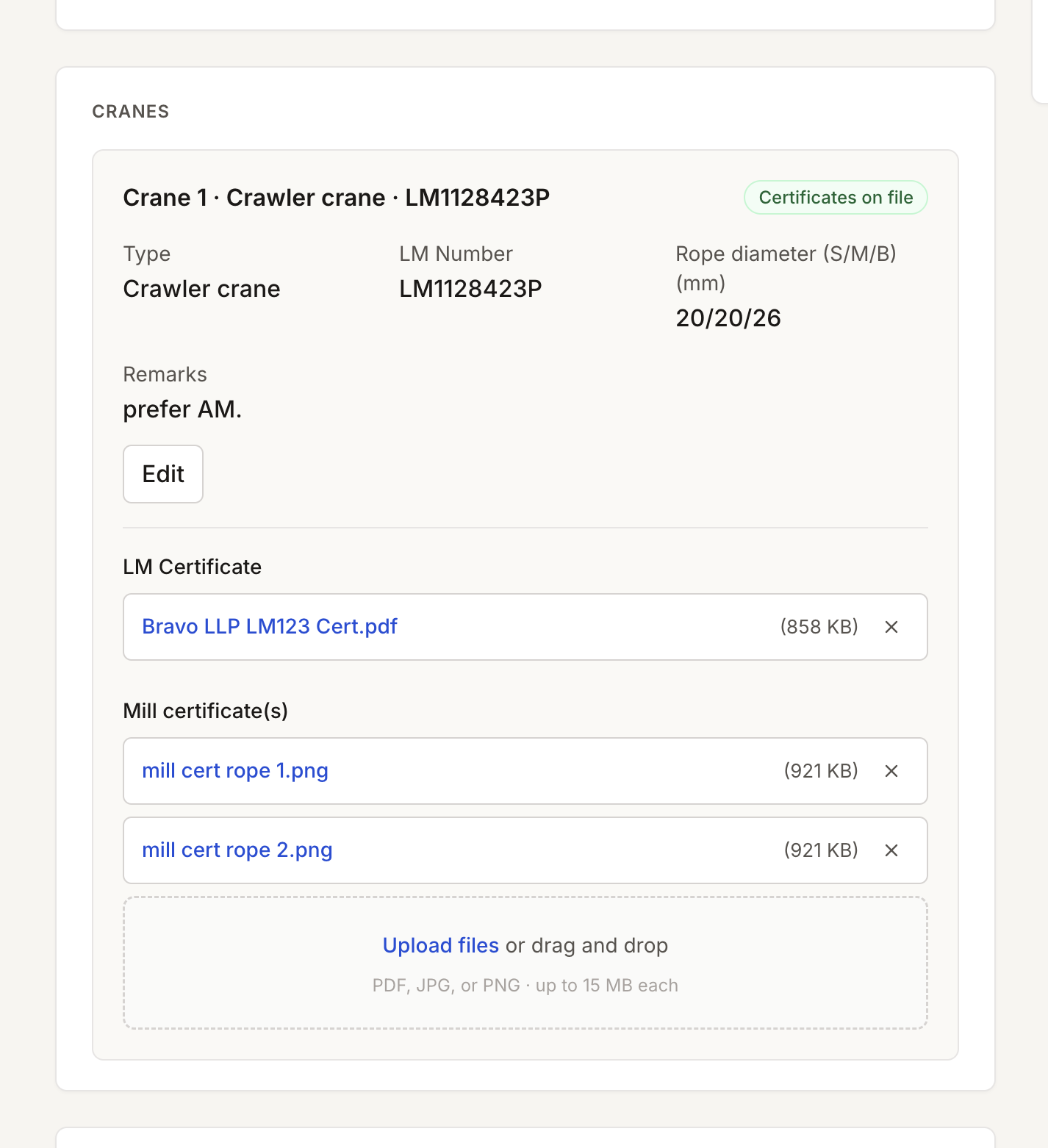
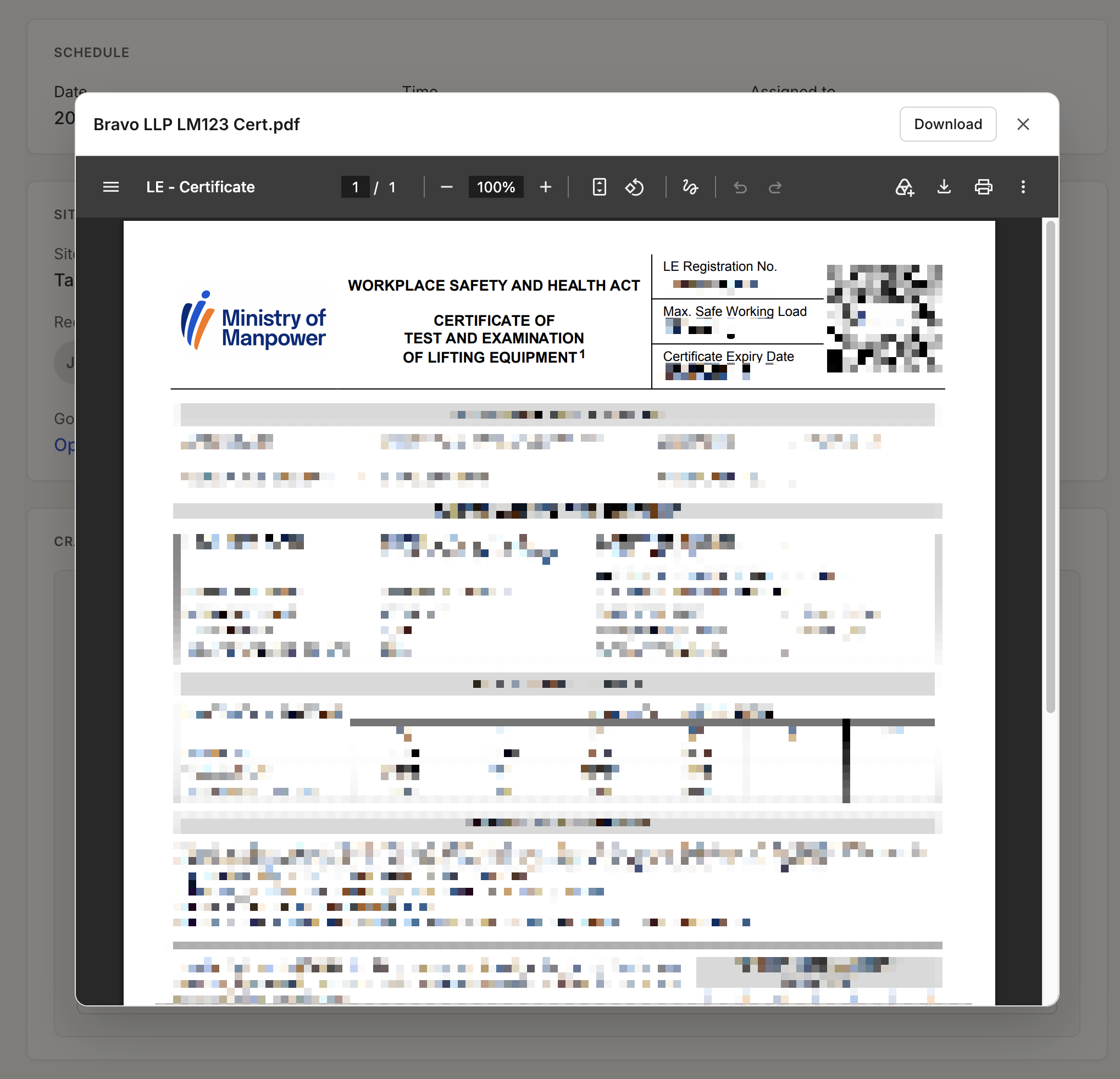
Before a job, FSPs need equipment-specific details — the crane's LM (load moment) number certification and the MILL certs for the ropes involved — info that used to be tracked down separately every time.
Options Considered
- A shared document repository: dropped — that would've meant standing up and managing a whole separate piece of software for what's really a simple need.
Decision
Admins upload the relevant LM number cert and MILL certs directly to the job, so FSPs have them ready as reference before heading out.
Rationale
Attaching certs at the job level keeps everything an FSP needs in one place, tied to that specific job, instead of a separate lookup process.
Result
FSPs now have one obvious place to grab the docs they need, instead of scrolling back through messages trying to find them.
Reflection
What I'd Do Differently
- Cut down on repeated information on the details page. Right now some info shows up twice — once as metadata up top, and again further down — and I'd want to show it clearly without the duplication.
- Push the visual design further from typical enterprise software — more colour, more personality. The calendar UI on the scheduled job details page is an early hint of the direction I'd want to take it.
What the System Still Can't Do Cleanly
- Send automated WhatsApp status updates — planned for the second iteration.
- Accept job requests through an interactive WhatsApp chatbot — planned for later on.
What I Learned
- Dogfooding the app as a trainee FSP myself meant I could design for what I actually needed on the ground, instead of relying entirely on secondhand feedback — which can sometimes reflect what users wish they wanted, rather than what actually works.
- AI-assisted development can spit out overly complex first answers. Clear, specific prompting helps a lot, and it usually worked better to walk through a problem step-by-step with the AI rather than dumping everything on it at once.